Program new remote
Default the unit before you begin a new installation. This erases all previously programmed remotes.
- Press the LEARN switch once to step to relay 1. (1 x beep sounds)
- Press the button on the remote control a few times to learn in to the receiver. (2x beeps sound)
- Continue to learn in any additional remote controls until all the remotes are programmed in.
- Press the LEARN switch again to Exit out of learn mode. (1 x Long beep sounds)
Programming the ON/OFF function
Default the unit before you begin a new installation. This erases all previously programmed remotes.
- Select the 1 sec & 3 sec relay time jumpers respectively.
- Press the LEARN switch once to step to relay 1 (ON command) (1 x beep sounds)
- Press the button on the remote control for the ON command. (2 x short beeps sound)
- Press the LEARN switch again to advance to the OFF command. (2 x beep sounds)
- Press the button on the remote control for the OFF command. (2 x short beeps sound)
- Press the LEARN switch again to exit out of learn mode (1 x long beep sounds
Erasing individual remotes
- Link the ERASE jumper
- Press the LEARN switch
- Press the remote to be erased
- Repeat step 2 & 3 for each remote to be erased.
- Remove ERASE jumper when
Relay time jumper settings
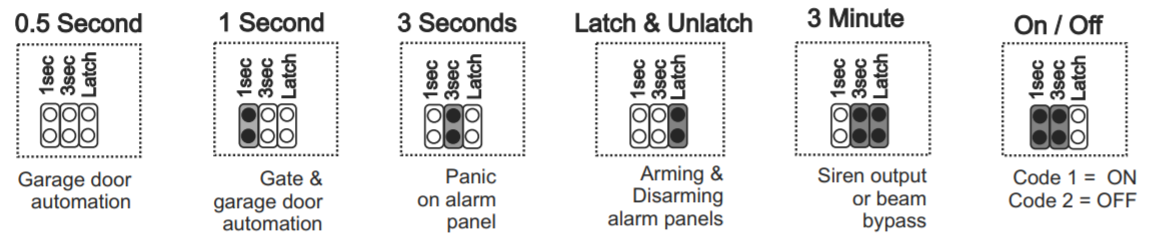
Default the unit
- Remove all jumpers
- Press and hold for more than 10 Seconds. When the beeping stops the unit is defaulted. Wait a few seconds until it re-boots
Note: Please default the unit first before installation. This will erase any previously programmed factory test remotes from the memory.